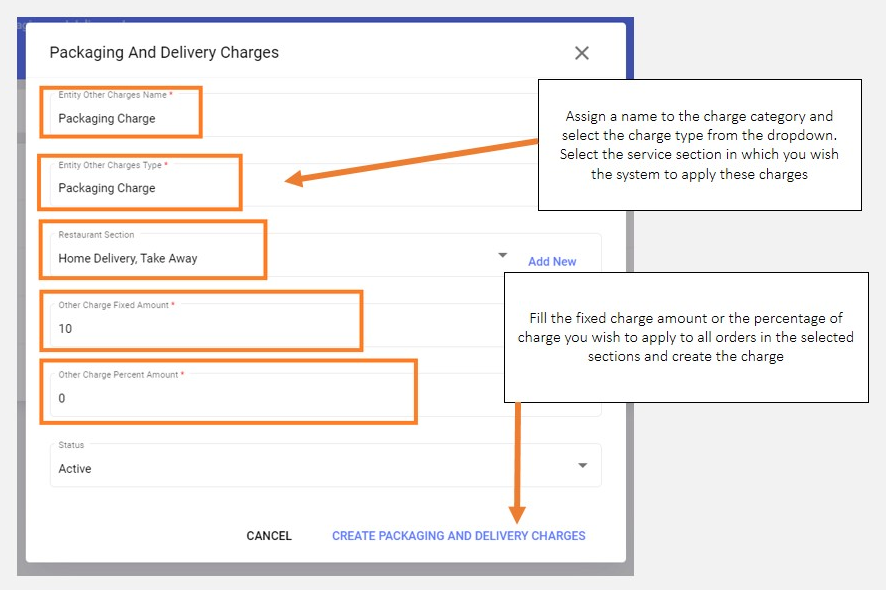
Setting up other charges applied by the outlet
::important The details provided by you, while setting up these sections on QRkey systems reflects/displays on the customer interface as well. Hence, it is important to ensure that these details are accurate, error-free and qualify for client exposure. ::: Some outlets may apply just one type of charge, while others may apply several charge types depending on the type of services provided by them.
Example
Restaurant A charging only a delivery fee on their home delivery orders will create only delivery charges on QRkey systems and apply them only on their home delivery section.
Example
Restaurant B charging packaging fee on both their home delivery and takeaway orders, and a delivery fee on their home delivery orders will create both a delivery and packaging fee. They, however, will apply both these charges only on the home delivery section. For their takeaway services, they will only apply the packaging fee.
Click Other Charges from the entity settings menu options to start setting up delivery or packaging charges that may be applied by the outlet, and integrated with the QRkey systems. Outlets may have different charge scenarios depending on their type of operations.
- Click the
+add button on your screen - Assign an appropriate name to this charge category and select the charge type from the drop-down list
- Select the service sections for which this charge category is applicable
- Define the charge amount - Flat or percentage.
Other charge categories should have its calculation logic defined appropriately. An outlet can either apply a flat charge on the bill or can have a percentage of the bill amount applied as a charge. Either way, the user will have to fill the required calculation logic details in the respective fields. If an outlet chooses to apply a flat charge, they will have to fill the flat charge value in the
Flat amountcolumn and0(zero) in thePercentage chargecolumn and vice-versa. - Mark the charge category active and click
Create Packaging and Delivery charges
note
These charges start getting applied automatically on all orders placed from sections for which these charges were selected and applied for. Hence ensuring the correct section mapping for packaging or delivery charge in extremely important.